Being obsessive and all, I decided to sit down and figure out why the signature tool doesn’t seem to work in Linux. After all it’s a rather trivial Java application. I suspected from the start that the symptom was some sloppy programming on RIM’s part, hard coding Windows style path names and my suspicion was correct. After modifying two class files and reassembling SignatureTool.jar the signature tool worked like a charm!
I don’t know what the legality is regarding redistribution of RIM’s development tools, specifically ones that have been modified so what follows is a description of the steps required to modify SignatureTool.jar to work in a Unix style file system (forward slash for directory separators).
Get SignatureTool.jar and extract it
It goes without saying that you will need the Java Runtime installed before starting. I would recommend the Sun JRE. In Ubuntu, you can install this by running
$ sudo apt-get sun-java5-jre
Grab a copy of the SignatureTool.jar and put it somewhere along with your .csk and .db files. I am using SignatureTool.jar from version 4.3 of the JDE. The remainder of this guide might be specific to this version as I will be editing constants and referring to them by index numbers.
~/lib/RIM43/bin/SignatureTool.jar
~/lib/RIM43/bin/sigtool.csk
~/lib/RIM43/bin/sigtool.db
Extract the SignatureTool.jar file into a temporary directory:
$ cd ~/lib/RIM43/bin
$ mkdir tmp
$ jar -xf SignatureTool.jar -C tmp
Editing the class files
Now I tried using a hex editor and a decompiler but by far the easiest method was to use a program called ClassEditor to modify the two files in question. Download the binary release and extract it, and run it with the command:
$ java -jar ce.jar
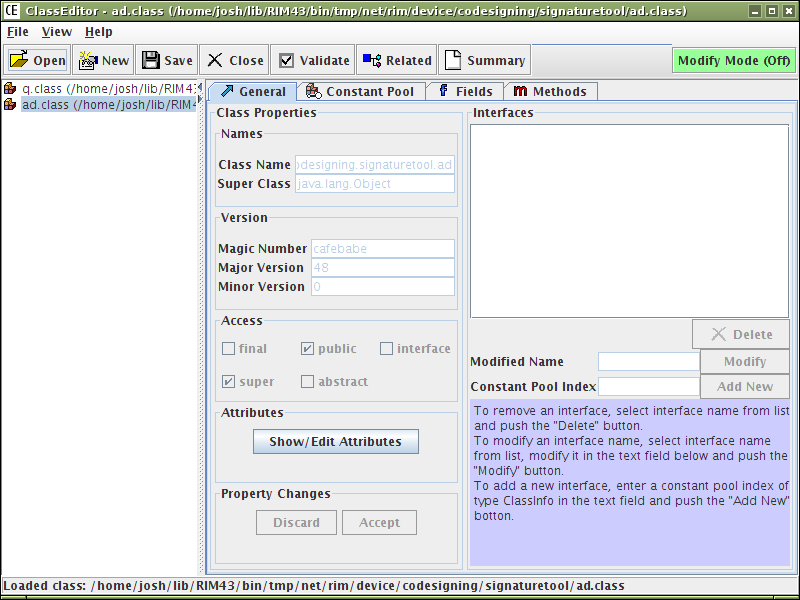
Open two class files extracted earlier: q.class and ad.class. ClassEditor will look something like this:
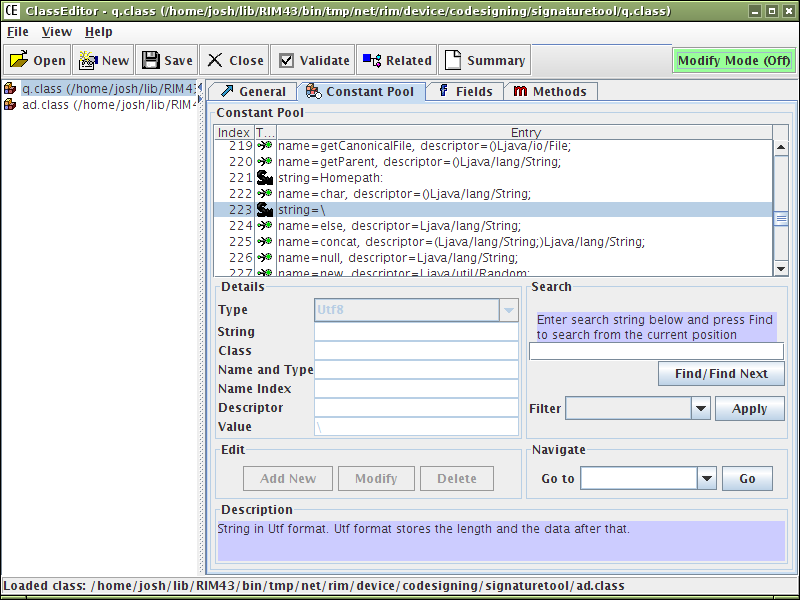
Start with q.class and select the Constant Pool tab. In this file we need to change string constants containing just a single backslash character. There are actually two constants in the pool but the first is just a reference to the second. The string we want is at index 223.
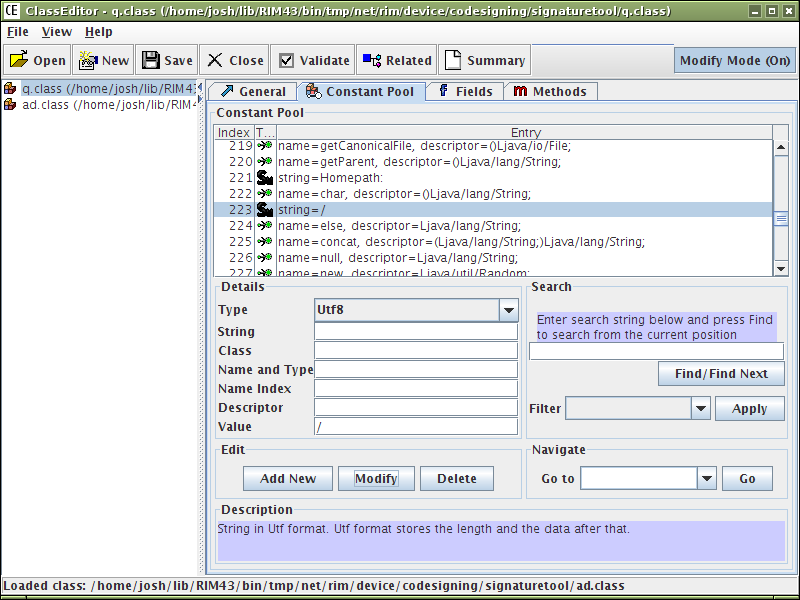
By default ClassEditor starts in read only mode so click the bright green Modify Mode(Off) button in the top right. The fields in the details area are now editable. Simply change the forward slash to a backslash and click Modify. Click save and that’s it for q.class!
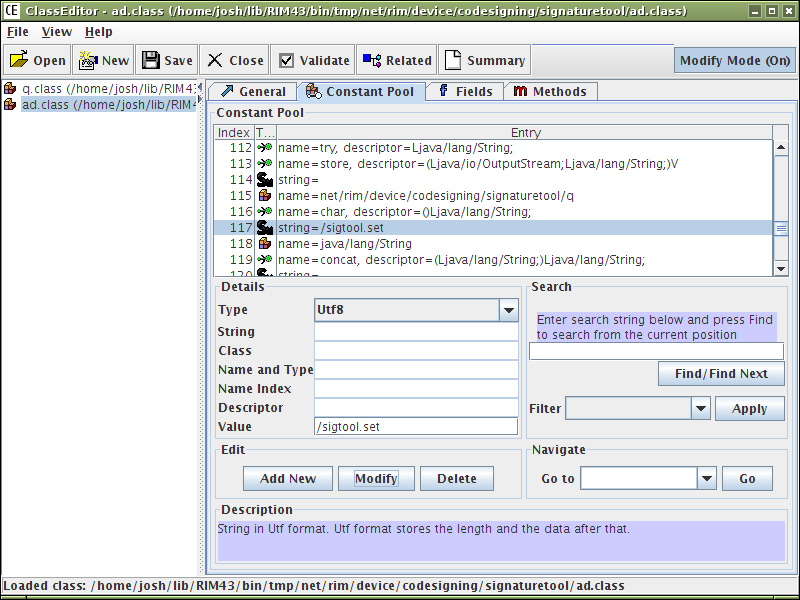
Select ad.class on left and locate constant 117, again in the Constant Pool tab.

Change the value from \sigtool.set to /sigtool.set and click Modify. Click save and that’s it for ad.class.
Repack SignatureTool.jar and test
To repack SignatureTool.jar just cd to the temporary directory where you extracted the jar and rejar the class files
$ cd ~/lib/RIM43/bin/tmp
$ jar -cmf META-INF/MANIFEST.MF ../SignatureTool.jar *
Go up one directory and remove the temp directory
$ cd ..
$ rm -rf tmp
To test that everything worked, just run the command
$ java -jar SignatureTool.jar
If should prompt you to locate a cod file. Just cancel this and click the Properties button in the main signature tool window. If you see a list of Registered Signers it worked!
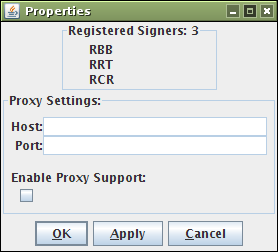
RIM are you listening?
At the off chance that someone from RIM is reading this, please forward this to whoever maintains this tool:
- Locate class containing the string “\sigtool.set”
- Change to java.io.File.separator + “sigtool.set”
- Locate class containing the strings “\“ + “sigtool.db”
- Change to java.io.File.separator + “sigtool.db”
- Locate class containing the strings “\“ + “sigtool.csk”
- Change to java.io.File.separator + “sigtool.csk”
Thanks!
octo August 23rd, 2009
For many older JDE tool versions, you also need to modify rapc.jar in a similar way. The offending backslashes are in the code that processes internationalization resource files, so you might not have noticed if you haven’t tried using those.
As of the gold version of the JDE 4.7 tools, I have some interesting observations to report:
First, you no longer need to modify rapc.jar
Second, you still need to modify a backslash in SignatureTool.jar, in the q.class file.
For normal operations, you may never notice this. I certainly didn’t. It never causes a problem most of the time. But in a weird situation that only happened on my build server, and only with multi-targetted builds, it lead to a temporary directory getting created in a way that confused the crap out of my build process. It took a lot of invasive debugging to figure this out.
Travis June 4th, 2009
I can confirm that you no longer need to modify JavaLoader.jar. It appears that the version RIM distributes is now portable across platforms.
Somebody April 21st, 2009
I don’t know if something has changed in more recent versions, but it does NOT appear to be necessary to make any modifications to the SignatureTool.jar file for it to work in Linux. Just run “java -jar SignatureTool.jar” and it works exactly the same as it does in windoze. Same with rapc.jar.
Mark Kopec February 9th, 2009
Wow, great post!
I’ve had to get my team to use VMware on top of Linux just to have a stable Windows environment to constantly sign and build each properly without the headache of doing fancy things like this with the sigtool and the rapc compiler.
Now however, to integrate and build this continuously with the rest of our server-side code these suggestions sound like a nice option!
Thanks JiGGak, how did you learn to dive into the HEX of the sigtool to make these changes!?! that’s great stuff!
M.
jiGGaK November 30th, 2008
Nice one Kevin!
Kevin November 30th, 2008
I tried the xvfb suggestion and it worked:
$ sudo apt-get install xvfb
$ xvfb-run java -jar SignatureTool.jar -a -C -p xxx xxx.cod
Thanks!
Kevin November 29th, 2008
I’m having the same problem as tvb: java.awt.HeadlessException
Did you, or anyone, come up with a solution or workaround? We don’t have time built into our project for me to reverse engineer the signing app, unfortunately. :)
Thanks.
tvb November 24th, 2008
Drag indeed! I looked at the method signatures of the tool hoping to find some public “sign” method that I could invoke through a custom wrapper class, but no such luck. RIMM isn’t all that great with documentation either, so it’s going to be tough to write a signature tool. I guess Xvfb is the best approach. Thanks for your help.
jiGGaK November 24th, 2008
Drag…
Well there is always the X windows virtual frame buffer. This enables X to run without any physical display hardware. I don’t have any experience with this though.
And if you are REALLY committed to this, you could attempt to reverse engineer the signing process in order to write your own signature tool sans-gui.
tvb November 24th, 2008
jiGGaK - thanks for the suggestion. Unfortunately, it looks like the tool is trying to bring up the GUI when it’s applying the siganture, so it still fails, even though I set the headless property to true:
Exception in thread "main" java.awt.HeadlessException
        at java.awt.GraphicsEnvironment.checkHeadless(GraphicsEnvironment.java:159)
        at java.awt.Window.(Window.java:317)
        at java.awt.Frame.(Frame.java:419)
        at javax.swing.JFrame.(JFrame.java:194)
        at net.rim.device.codesigning.signaturetool.v.a(Unknown Source)
        at net.rim.device.codesigning.signaturetool.v.(Unknown Source)
        at net.rim.device.codesigning.signaturetool.SignatureTool.(Unknown Source)
        at net.rim.device.codesigning.signaturetool.SignatureTool.main(Unknown Source)
jiGGaK November 24th, 2008
Try telling AWT that the vm is running in headless mode:
java -Djava.awt.headless=true -jar SignatureTool.jar
(note: I have never tried this before)
tvb November 24th, 2008
Is it possible to perform the signing operation without the X11 display? I’m trying to automate the build on a Linux box without the X11 setup, but it’s complaining that the operation requires X11:
Exception in thread "main" java.awt.HeadlessException:
No X11 DISPLAY variable was set, but this program performed an operation which requires it.
jiGGaK November 2nd, 2008
Patrick,
If the properties window does not show a list of registered signers then you probably made a mistake when patching the jar file.
If you mean that when loading your .cod files you get an error, this might mean that there are files missing in the .cod file directory. Make sure that the directory your cod files are in have ALL of the other files generated by the rapc compiler.
As a side note, if you get SignatureTool.jar from a recent version of the JDE (at least 4.6), the hard coded backslashes have already been fixed.
Patrick Waugh November 1st, 2008
Ok, everything now works except that SignatureTool.jar does not think that my keys are registered.
How can I “fix” this? I have a sigtool.csk, and .db, and the three .csi files, but I get the “Not registered” error.
Patrick
Patrick Waugh September 17th, 2008
Excellent post, cudos! Worked the first time. I then put the SignatureTool directory under my ~/bin and then created a link to the SignatureTool.jar in ~/bin so I can run it from any build directory I want as it is on the path.
Craig Hollabaugh September 10th, 2008
jiGGaK,
Excellent post! I can now do all my bb dev on linux using sun wtk, signing was the last part. Thanks!
The signature tool supports command line options
java -jar SignatureTool.jar -help
I now do automatic signing with
java -jar SignatureTool.jar -a -c -p mypass myapp.cod
Craig
Mikel July 16th, 2008
>WOOT!<
If you are planning on signing COD files in a different directory then the Build folder you must bring the .cso file.
If you do not bring this file along the Signature tool will not be able to load the cod file into its list of files to sign.
Mikel July 16th, 2008
Thanks, though this did not solve the issue here.
jiGGaK July 16th, 2008
Mikel,
You’re right, all three signature tool jar files are exactly the same. It seems as though RIM decided not to fix this problem in JDE 4.5.0, despite it being an extremely simple problem to fix.
My jar file after modification has the following MD5 sig: a77ddd90536392dd4c21f64c06d5a6e4
I have emailed you a copy of the modified JAR.
Mikel July 16th, 2008
It seems that I the 4.3.0 signature tool jar no longer exists on the tubes.
Would you be willing to contact me at mikel (aht) skywardmobile dot com to help me find it?
Mikel July 16th, 2008
Interestingly, all 3 of my installed JDEs have the same SignatureTool.jar. So perhaps the 4.5.0 jar is ‘broken’
These are all installed in a normal Windows enviroment.
MD5 (BlackBerry JDE 4.2.1/bin/SignatureTool.jar) = dcf41c19a5fb35362bd1ab26b2a7dfa0
MD5 (BlackBerry JDE 4.3.0/bin/SignatureTool.jar) = dcf41c19a5fb35362bd1ab26b2a7dfa0
MD5 (BlackBerry JDE 4.5.0/bin/SignatureTool.jar) = dcf41c19a5fb35362bd1ab26b2a7dfa0
Mikel July 16th, 2008
I have tried the signature tool from 4.2.1, 4.3.0 and 4.5.0.
jiGGaK July 16th, 2008
Mikel,
What version of the JDE did you get your SignatureTool.jar file from?
Mikel July 16th, 2008
Close, but no cigar. If I take the same cod file and try and sign it on Windows it works fine.
Another detail is that when I start the gui on windows I am able to click ‘add’, select the cod file, and see it appear on the list. On Linux and OSX I cannot get the cod to appear on the list. My guess is that there is something going wrong with the path lookup for the cod files.
I have tried bash,tcsh, and sh, just in case it was an environment variable. I also tried relative and explicit paths.
jiGGaK July 15th, 2008
akaboy,
If you click “Properties” button in the signature tool and you see a list of registered signers than the .csk and .db files where located correctly. If you don’t see a list of signers, backtrack and make sure the class files where edited correctly.
As for why your password is not recognized I’m not sure. The only thing I can suggest is checking the obvious things like making sure the capslock key is not on.
akaboy July 15th, 2008
Thanks for the writeup. I followed the instructions and everything is the way it should be. My current problem is that I try and enter in my private key password and I always get invalid password. This works fine on my windows box. Is this an issue locating the sigtool.csk file? It seems to be finding my sigtool.db file correctly since I do see my registered signers. Any help would be appreciated.
JiGGaK July 14th, 2008
Mikel,
My first guess would be that your OCD files are not using any protected APIs and therefore signing is not required.
Mikel July 14th, 2008
Thanks for the response. With these changes I can load the signatures correctly however it doesn’t seem to want to find my COD-files. When I choose “Add” from the UI it won’t add anything. The command line output says “no signatures required.” Any suggestions?
atleta July 7th, 2008
Hi, great news! I’m just starting BB development and would have been be very sad to buy windows to develop for a java platform. :)
Actually using backslashes for file separators is a shame because forward slashes work on windows as well. (I mean if you use forward slashes in a java application as a file separator.)
jiGGaK July 3rd, 2008
Mikel,
Put those files in the same directory as SignatureTool.jar (same as on windows)
Mikel July 3rd, 2008
No problem with the instructions, but where should the sigtool.* files be places? I have them in the working directory and in /
Where are you all placing them?
jiGGaK May 18th, 2008
Andrew,
Unfortunately without more information I can’t be of much help to you. The only suggestion I have is to extract your modified JAR file and verify the classes in question have in fact been modified with the new strings.
Andrew Green May 12th, 2008
Hi, I’ve followed the steps, but am seeing unchanged behavior with the modded version, both on Mac and Linux. I hate to leave a generic “it didn’t work for me message”, but it was very straightforward and makes perfect sense, I can’t see any other strings (at least in those classes) that you might have missed, but it doesn’t work for me.
Robert April 14th, 2008
Thanks a lot for this guide - I have linked it from the J2ME Polish website! Cheers from Germany, Robert
Comment submitted