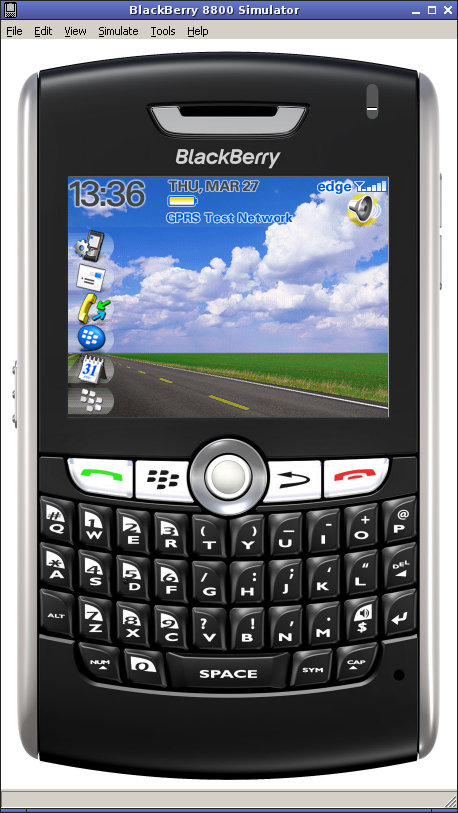
Call me crazy but I just can’t seem to accept that if you want to (or have to) write BlackBerry software you’re stuck with Windows. It bugs me.
There is good news and bad news regarding the simulator. The good news is with a recent version of Wine you can actually get the BlackBerry simulator to run. The bad news is that it’s a bit buggy, and debugging hardly works at all.
What to expect
Your millage may vary! Generally I find that the simulator is usable for most testing. Attaching a debugger to it (via JDWP) just seems to cause the simulator to hang. Mind you, I have a rather slow system (AMD XP 2500+) and I would love to hear about your experiences if you have a faster computer.
Ingredients
Wine - You need the most recent version you can get your hands on. The package in the Ubuntu repository won’t due. So if you have installed this one, remove it and follow these instructions to get the latest and greatest.
For some reason until I performed the following steps, the simulator would always crash on startup:
rm -rf ~/.wine- Start up
winecfg - Applications tab - select Windows 2000 from the dropdown list
- Audio tab - select ALSA Driver from the drivers list
It should go without saying that you will need a copy of the JDE or one of the simulator packages. If you have access to a Windows box, just zip up the JDE or simulator and copy over. Otherwise, there are a few tricks to extracting the contents of the setup package.
Extract the setup package:
$ wine BlackBerry_JDE_4.2.1.exe /extract:c:\\
Which extracts the files to ~/.wine/drive_c/
Use msiexec to install the package:
$ wine msiexec /a c:\\jde_installer.msi /qn
Which extracts the file to ~/.wine/drive_c/Program Files/Research In Motion/BlackBerry JDE 4.2.1. This is a cumbersome path at best so move this somewhere more usable:
$ mv ~/.wine/drive_c/Program Files/Research In Motion/BlackBerry JDE 4.2.1 ~/lib/JDE4.2.1
Cleanup:
$ rm ~/.wine/drive_c/jde_*
Run the simulator
I created a shell script from one of the existing batch files for launching:
$ cat 8800.bat | dos2unix > 8800.sh
$ gvim 8800.sh
Replace the @echo off with #!/bin/bash and insert the wine command before the fledge.exe. Mine looks like this:
wine fledge.exe /app=Jvm.dll /handheld=8800 /session=8800 \
/app-param=DisableRegistration /app-param=JvmAlxConfigFile:8800.xml \
/data-port=0x4d44 /data-port=0x4d4e /pin=0x2100000A
Set the execute permission:
$ chmod +x 8800.sh
Now just run it!
$ ./8800.sh
Don’t give up if the first time you run it the thing crashes. Give it a few tries.
Debugger
So you fancy yourself an adventurer do ya!?! Well, good luck.
Thankfully, RIM hasn’t made the same mistake with JDWP as they did with the signature tool but you will still have to modify a number of text files to convert the Windows path names to Unix ones.
$ cd ~/lib/JDE4.2.1/bin
$ cp SimPackage-JDE.rc SimPackage-JDE.orig
$ cat SimPackage-JDE.orig | sed 's/\(Command.*\)=%/\1=wine %/' | sed 's/\\/\//g' > SimPackage-JDE.rc
$ cp FixedBuild.rc FixedBuild.orig
$ cat FixedBuild.orig | sed 's/\(Command.*\)=%/\1=wine %/' | sed 's/\\/\//g' > FixedBuild.rc
$ cp DefaultBuild.rc DefaultBuild.orig
$ cat DefaultBuild.orig | sed 's/\\/\//g' > DefaultBuild.rc
If you copied the JDE from a Windows box you might need to update other files. You must also remove Settings.rc if it already exists.
Make sure you have the Sun Java Runtime installed by running java -version. Now all that’s left is to start up the JDWP:
$ java -jar JDWP.jar
On startup, there will be an error message about RIMUsbJni.dll but you can safely ignore this. And that’s just about it; your JDWP client connects as usual (jdb, eclipse, netbeans). Feel free to leave your successes/failures in the comments.
jiGGaK July 16th, 2012
Last time I was doing bb dev was about 2-3 years ago. At that time not much had changed on the linux front. The barry project has continued to progress and the bjavaloader tool still works great. Last time I checked the simulator was still hit or miss with wine, but networking in VirtualBox has got a lot easier so running the simulator in a virtual machine is pretty straight forward.
Eric Sebasta July 16th, 2012
Has this gotten any easier? Have you tried this with newer Linux’s? I see this is a long time with no comments…
Iordan January 21st, 2011
Hi guys,
When I run BlackBerry Simulator 6.0 with Wine 1.1.42, I get screwed up graphics. However, turning Graphics Acceleration off fixes this. You can do this by clicking View->Graphics Acceleration->Off However, I also get:
Internal Error - BlackBerry 9800 Simulator
------------------------------------------
Access violation reading from 0x000001BC
errors when I reset or exit the machine. Any ideas on how to fix this? The console does not show any errors when this happens.
Thanks, and I hope I helped somebody! Iordan
lucadom September 22nd, 2010
just got it to work, before always had 507 error. had to set in winecfg use native msxml library instead of builtin. hope this help.
jiGGaK July 7th, 2010
I haven’t attempted to use the simulator under wine in several months. Even when I had, it was not very stable.
Try using this guys article. Specifically, try installing GDI+ using winetricks script.
Arkka July 6th, 2010
Hi,
i’ve download Blackberry simulator and install via wine.
And i have already instal MSXML.msi.
But, there no picture on the screen (blank). But i can access the mainmenu.
please help
Mate October 30th, 2009
Great article. Works fine under Mac OS X 10.5.8.
Andrey April 5th, 2009
To fix
“Access violation reading from 0×00000024”
run the command on a single CPU
taskset -c 0 wine fledge.exe ...
Wine has issues with SMP.
Hope this will help someone.
afallenhope January 15th, 2009
Hey, awesome tutorial, I was just wondering, do you have any way of getting eclipse to work? This is somewhat outdated however, most of the steps worked. Oh, I’d like to add the “thank a lot”, for the tutorial. I’m using wine 1.1.2
Jason November 23rd, 2008
Has anyone had more luck getting the newer JDK 4.6 version of the simulator to run in wine? When I try using winetricks to install gdiplus and msxml3, I still can’t get it to work. I get the following errors:
fixme:file:MoveFileWithProgressW MOVEFILE_WRITE_THROUGH unimplemented
fixme:win:EnumDisplayDevicesW ((null),0,0x32eb0c,0x00000000), stub!
fixme:wtsapi:WTSRegisterSessionNotification Stub 0x10040 0x00000000
fixme:dciman:DCICreatePrimary 0x584 0x27813a8
fixme:wtsapi:WTSUnRegisterSessionNotification Stub 0x10040
Patrick Waugh October 31st, 2008
Article was helpful, although you have to also install MSXML.msi with:
$ wine start MSXML.msi
after which, all works wonderfully. :)
Patrick
mercy September 26th, 2008
i faced the similar problem as you say. i.e “Error inside JVM - Access violation reading from 0×0000000C”.
just run the clean.bat file from this path Program Files\Research In Motion\BlackBerry JDE 4.6.0\simulator just try…
Cay Horstmann September 15th, 2008
Thanks. I tried all that, and no luck. FWIW, I get the exact same error with JDE4.3. It says “Error inside JVM - Access violation reading from 0×0000000C”.
jiGGaK September 15th, 2008
Nope, you don’t need Java inside of wine.
Sadly it’s hit or miss with getting this working. Even if it works it’s not that stable.
However, you might try removing your ~/.wine directory and re-initializing it by running winecfg. I’m using WindowsXP emulation and I have alsa selected as the audio library.
Note: removing ~/.wine will remove your virtual C: drive and all your wine settings.
Cay Horstmann September 15th, 2008
Ok, now I installed the latest Wine (1.1.4).
When running the 8800.sh file with JDE4.2.1, I get an
Internal Error - BlackBerry Device Simulator
--------------------------------------------
Access violation reading from 0x0000000C
Do I need Java installed under Wine?
jiGGaK September 14th, 2008
Recent versions of the simulator (4.5 and 4.6) don’t work very well under wine.
Also, make sure your using the most recent version of Wine as possible.
Cay Horstmann September 10th, 2008
I get the following error with Wine 1.0 in Ubuntu:
fixme:file:MoveFileWithProgressW MOVEFILE_WRITE_THROUGH unimplemented
fixme:gdiplus:GdipSaveGraphics graphics state not implemented
fixme:gdiplus:GdipRestoreGraphics graphics state not implemented
fixme:gdiplus:GdipCreateBitmapFromHBITMAP don't know how to handle 16 bpp
fixme:gdiplus:GdipSetClipRectI not implemented
wine: Call from 0x7b844b20 to unimplemented function gdiplus.dll.GdipResetClip, aborting
fixme:gdiplus:GdipCreateBitmapFromHBITMAP don't know how to handle 16 bpp
wine: Call from 0x7b844b20 to unimplemented function gdiplus.dll.GdipResetClip, aborting
err:seh:setup_exception_record stack overflow 296 bytes in thread 001a eip 7b8539db esp 00241208 stack 0x240000-0x241000-0x340000
The emulator shows with the upside-down display, but then it hangs.
I then cleverly copied gdiplus.dll into the /windows/system32 directory of Wine, and those errors go away. Instead I get
fixme:file:MoveFileWithProgressW MOVEFILE_WRITE_THROUGH unimplemented
fixme:win:EnumDisplayDevicesW ((null),0,0x33eae8,0x00000000), stub!
fixme:win:EnumDisplayDevicesW ((null),0,0x33eae8,0x00000000), stub!
fixme:wtsapi:WTSRegisterSessionNotification Stub 0x1007e 0x00000000
wine: Call from 0x3d10f08c to unimplemented function msvcrt.dll._ftol2_sse, aborting
fixme:wtsapi:WTSUnRegisterSessionNotification Stub 0x1007e
At this point, the app doesn’t come up at all. Sigh.
Cliff August 22nd, 2008
I’ve been at it time and again and I can’t seem to run rapc.exe from Linux or OSX! I’m not using rapc.jar directly because according to RIM the exe passes some secret but necessary values to the Jar. I went the path of invoking the jar directly but ultimately ended up with sporadic application crashes and preverify errors. From what I’ve learned all of the tools (except for the SignatureTool.jar) need to be at a version level equal to or lower than your target or you’ll be subject to random application failures and undefined behavior after compiling. Rolling my tool set back to version 4.2.1 almost forces me to use Windows because it (older rapc) relies on preverify (NOT preverify.exe) and javac being located in the PATH which means I have to wrapper preverify.exe with a shell that calls it under wine. (This much does work but is extremely painful.) There’s more to the story that I plan to post to my site soon.
Fred July 7th, 2008
I managed to extract the phone “plastic” image and invert it (vertically) and then copy it back to the fledge.dat (zip) file. The plastics image files are in the /res/plastics/ folder in this zip file. That solved that problem.
The LCD display is messed up when the simulated trackball is moved. That may be a problem with the flash player I’m using, but I can’t tell.
jiGGaK July 7th, 2008
Fred,
I have the same problem with the 4.5.0 simulator and I haven’t found a way to make it work. It seems using an earlier version is the only option.
Fred July 6th, 2008
I can get the simulator to run, but the phone image is upside-down and backwards, while the LCD image is correct.
Any idea what’s wrong or how to fix this?
wine-1.0-1.fc8 & LDE 4.5.0
Fred
Mack April 17th, 2008
Hi:
I’ve follow up your howto but the simulator don’t work, I’ve try it few times, but I got a few errors message like:
Access violation reading from 0x00000024
or the simulator init but it frozen when the Media Card Inserted message appear.
I’ve wine 0.9.58 en JDE 4.2.1
I’ll appreciate your help.
Regards
jiGGaK April 3rd, 2008
Paul,
Are you serious? Go over to the post about the MDS simulator… there is a script already written for you, just copy/paste!
And use the comments section over there for issues related to MDS please. Thanks.
Paul April 3rd, 2008
Ok, I’m of the noob variety. How to I convert the following to run as a shell script in Linux? … (or do I?)
@echo off
call setBMDSEnv

if ["%JAVA_HOME%"] == [""] goto noJavaHomeSet
    start cmd /v:on /c "%JAVA_HOME%\bin\java" -classpath !BMDS_CLASSPATH!;!BMDS_CLASSPATH2! -Xmx512M -DKeystore.Password=password net.rim.application.ipproxyservice.IPProxyServiceApplication -log.console.dump
    goto end
:noJavaHomeSet
    start cmd /v:on /c java -classpath !BMDS_CLASSPATH!;!BMDS_CLASSPATH2! -Xmx512M -DKeystore.Password=password net.rim.application.ipproxyservice.IPProxyServiceApplication -log.console.dump
    goto end
:end
Wait… Spider senses tingling … Isn’t this all just java? Could it be as easy as running it using my Linux java (i.e. nothing to do with wine)? Either way, you can still save me hours of hacking.
Paul April 3rd, 2008
Uh, ok. Same as the simulator. I’ll try that now…
Paul April 3rd, 2008
Oh sweet Blackberries! It works using wine 0.9.58! THANK YOU!!!
OK, now how do I get MDS to run?
Paul April 3rd, 2008
Doing so now… Thanks!
jiGGaK April 3rd, 2008
Paul, you are going to need a MUCH more recent version of wine than the one you have. In fact, I wouldn’t even bother unless you have the latest version (0.9.58).
Paul April 3rd, 2008
BTW, to be able to run the simulator through wine (and the MDS, which is not part of these instructions, if I understand correctly) would be wonderful. I’ve been wanting this for years.
Paul April 3rd, 2008
When I try to run the simulator in wine I get:
err:bitmap:DIB_GetBitmapInfo (44): unknown/wrong size for header
err:seh:setup_exception stack overflow 24 bytes in thread 0009 eip 7eddd84f esp 00240fe8 stack 0x241000-0x350000
Wine failed with return code 1
The image of the 8703e does appear but I get a “Division by zero” error and a Microsoft Visual C++ Runtime Library error of “This application has requested the Runtime to terminate in an unusual way.”
I’m running wine-0.9.25 / debian / gnome and BlackBerry device simulator 4.1.0.359.
Any ideas? Anyone?
Comment submitted