Now this process isn’t 100% ideal. If you are an experienced developer you probably already know you need four key components.
- Rapc compiler
- Signature tool
- Simulator
- Javaloader
The first two components works fabulously in Linux. The second (signature tool) needs a kick in the pants to work (shame shame shame!).
The third is hit or miss when using Wine. So a less painful option is to put windows in a virtual machine and run the simulator there (more on that later).
And the fourth I just can’t get past. There is the barry project which has made impressive progress in the last few months and lists javaloader support as on the roadmap for milestone 4. RIM, if you have any sympathy for us non-windows users show these guys some love and send them some specs for heaven sakes!
This article presents the basics for compiling, signing, and debugging BlackBerry applications with Linux.
Rapc Compiler
First you need a copy of the JDE or the JDE components package. In my last article I covered a method of extracting the install packages distributed by RIM, but if you have access to a Windows box copying the installed JDE works just fine too.
The rapc compiler needs two external commands:
- Java Compiler (javac)
- Preverification Tool (preverify)
Install the Sun JDK to get javac:
$ sudo apt-get install sun-java5-jdk
The preverify command can be obtained by downloading the Sun WTK.
$ chmod +x sun_java_wireless_toolkit-2_5_2-linux.bin
$ ./sun_java_wireless_toolkit-2_5_2-linux.bin
For some reason this package complains it can’t find Java interpreter. If this happens, the Java 5 JDK is located /usr/lib/jvm/java-1.5.0-sun/bin on Ubuntu.
Once extracted, unless you plan on doing vanilla J2ME development, you can copy the preverify tool and then delete the WTK.
$ mkdir ~/bin
$ cp ~/lib/WTK2.5.2/bin/preverify* ~/bin
$ rm -r ~/lib/WTK2.5.2
Don’t forget to put the ~/bin directory in the execution path. To have this set automatically each time you login, put this line in your ~/.bash_profile file (create it if necessary).
export PATH=~/bin:$PATH
Compile “Hello, World!”
I’ll be using Apache Ant for building because it’s the common denominator when it comes to building Java projects (like it or not). Most IDE’s have some level of support for running ant scripts.
Install ant:
$ sudo apt-get install ant
Download bb ant tools and put it where ant can find it:
$ unzip bb-ant-tools-0.7-bin.zip
$ mkdir -p ~/.ant/lib
$ cp bb-ant-tools.jar ~/.ant/lib
Download the hello world project and run ant in the project directory:
$ wget http://slashdev.ca/2008/04/03/blackberry-development-using-linux/hello.tar.gz
$ tar -xzf hello.tar.gz
$ cd hello
$ ant
Output from the ant should look something like this:
josh@ubuntu:~/hello$ ant
Buildfile: build.xml

build:
    [mkdir] Created dir: /home/josh/hello/build
     [rapc] Compiling 1 source files to ca_slashdev_hello.cod

BUILD SUCCESSFUL
Total time: 1 second
Signing
To sign your cod files, follow my guide on how to fix the signature tool. Then just run the sign target in the build script.
ant sign
VirtualBox
Running Windows in a virtual machine may seem like a cumbersome process but it can be made relatively painless. VirtualBox is very popular and available for most if not all Linux distros. I’m using Ubuntu but you could just as easily apply most of the steps to other distros.
There is an excellent guide here with instructions on how to get it up and running. But here is the short version:
$ sudo apt-get install virtualbox-ose
$ sudo gpasswd -a `whoami` vboxusers
$ sudo modprobe vboxdrv
Launch VirtualBox from the System Tools category in the gnome menu. Hint: to make VirtualBox look a little less out of place in a gtk environment:
$ sudo apt-get install polymer qt3-qtconfig
Launch qtconfig and select Polymer from the GUI Style list:
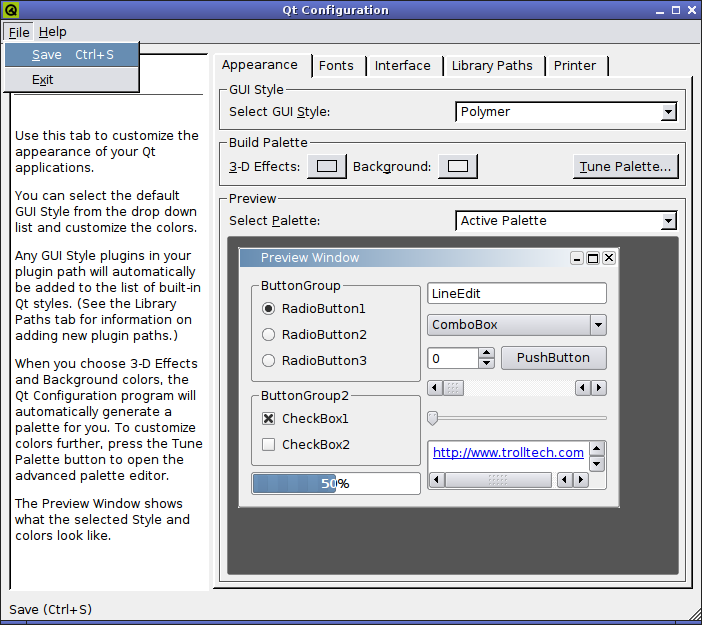
I’ll save the boring details of installing Windows in a virtual machine. Here is a list of software that you will need to install in Windows once you have it installed.
- Java JDK 1.5+
- RIM JDE 4.1+
- VirtualBox Guest Additions (Devices menu in VirtualBox)
Host Networking
Now this bit is most important. We need Windows to appear as just another host on the network so that we can connect to JDWP running in Windows from Eclipse running in Linux. We also want to mount a windows shared folder in Linux to quickly copy files to the simulator directory.
It’s not enough to just configure the virtual machine to use Host interface, we need to setup a bridge in Linux too. There are hundreds of guides on the interweb describing how to do this. Google “virtualbox host networking“ and you will get tons of great links.
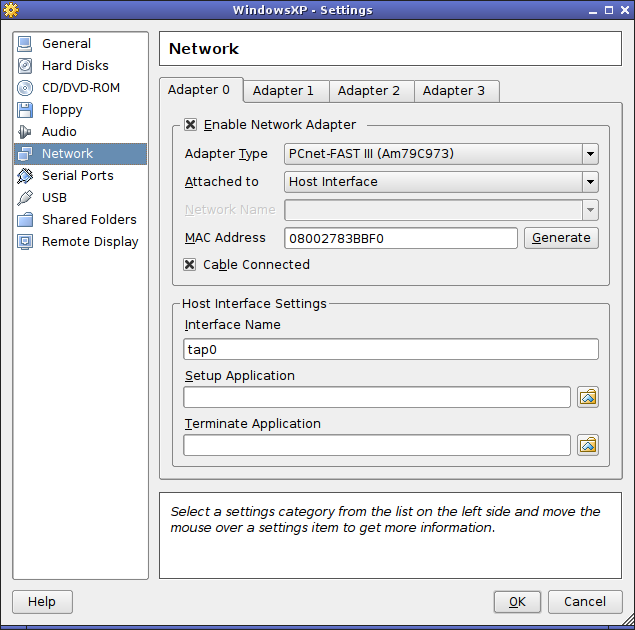
I am really only concerned with having two-way communication between Linux and Windows so I am using an unused network interface on my system to setup the bridge. This interface is not connected to my network and gets statically assigned a private IP. If you don’t have a spare interface, or you use wireless networking, see this guide for help.
Required tools:
$ sudo apt-get install bridge-utils uml-utilities
Script to bring up the bridged interface:
MYUSER=$USER
# create new bridge
sudo brctl addbr br0
# bright down the ethernet interface and add it to the bridge
sudo ifconfig eth0 0.0.0.0
sudo brctl addif br0 eth0
# set bridge to static private address
sudo ifconfig br0 10.0.0.1 netmask 255.255.255.0
# create tap interface
sudo tunctl -b -t tap0 -u $MYUSER
sudo ifconfig tap0 up
sudo brctl addif br0 tap0
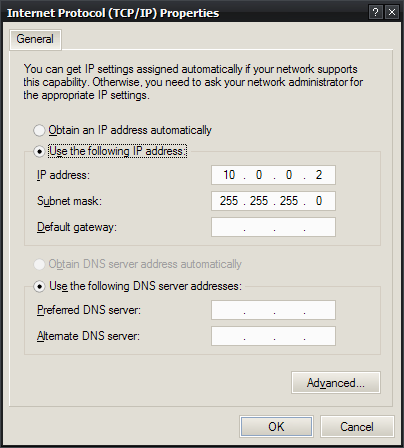
Now simply run the script once prior to starting Windows. In this case the interface on the host (Linux) is not connection to the network and has a static IP so I must also set a static IP in the guest (Windows).
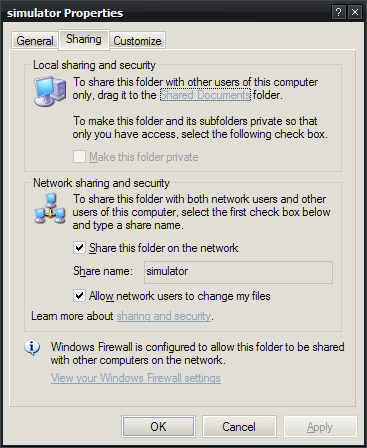
In Windows Explorer, locate the directory where you have installed the JDE, right click the simulator directory and click “Sharing and Security”. I think this dialog is different depending on the edition and service pack of windows but for me (XP Pro, SP2) I just had to check “Share this folder on the network” and “Allow network users to change my files”.
Running the Debugger
Start JDWP in Windows. Back in Linux, mount the Windows shared directory:
$ sudo mkdir /mnt/simulator
$ sudo mount -t cifs //10.0.0.2/simulator /mnt/simulator
Use the load-simulator target from the build script in the hello world project to copy the required files over to the mounted simulator directory.
$ ant load-simulator
Run the debugger! For some reason an exception occurs when using jdb at some point, but simply type resume<enter> to get past it. When using Eclipse, I don’t have this problem.
$ jdb -connect com.sun.jdi.SocketAttach:hostname=10.0.0.2,port=8000
Seamless Mode
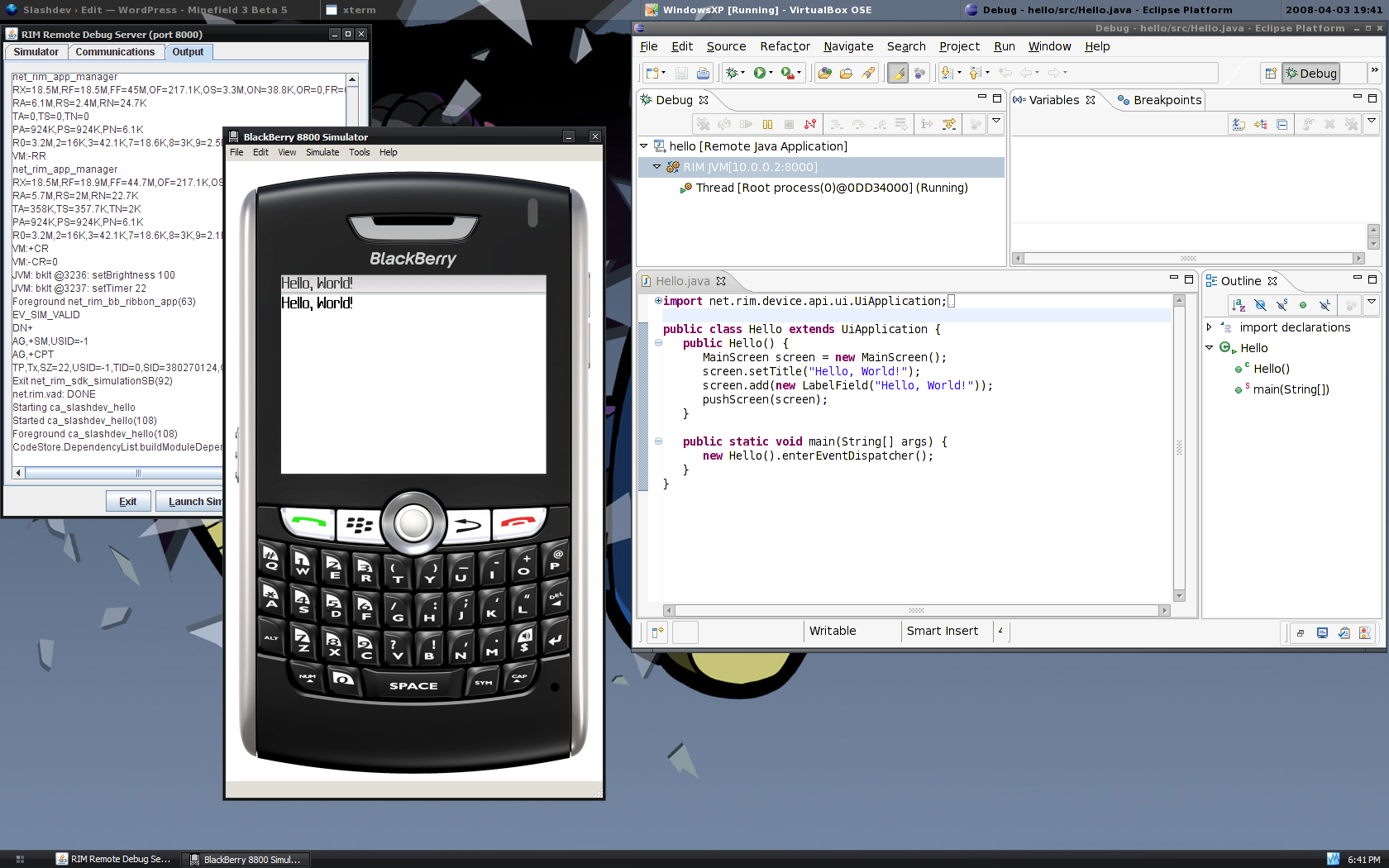
And finally there is one last trick to make using the simulator in a Windows virtual machine a bit more enjoyable: Seamless Mode. Provided you installed the guest additions in Windows you can activate this by selection “Seamless Mode” from the “Machine” menu in the VirtualBox window. This hides the Windows desktop and makes it look like the applications running in Windows are actually running in your Linux desktop.
PJ September 28th, 2011
Very useful post. For extremely basic results (in answer to some of the queries above) I started in a basic directory of hello. Then mkdir bin and mkdir lib.
I copied preverify, preverify1.0, preverify1.1, rapc.exe and rapc.jar into bin. Copied net_rim_api.jar in lib and set jde.home=. (working directory) in the build.properties file.
Then ant builds a jar and jad (and cod). I then bluetoothed jad and jar to Blackberry, and explored Documents Folder via media. Click on the jad and it will install.
This is all just on principle of Good Enough to see if it works and wouldn’t be suitable for large projects or production. (ubuntu 11.10, Blackberry Curve 9300)
jiGGaK August 30th, 2010
Alexey,
Try searching the bb-ant-tools mailing list. I know something similar to this topic has been covered there before.
http://sourceforge.net/mailarchive/forum.php?forum_name=bb-ant-tools-general
Alexey Potapkin August 30th, 2010
I have a problem with a project with a lot of .java files (over 1000). At first I had “Create process error=87” problem at java start. It was solved by adding “generatesourcelist=”true”” flag to ant task. And now i stuck at the similar problem that appears at javac start. It looks like
[rapc] I/O Error: Cannot run program “javac”: CreateProcess error=87, The parameter is incorrect. Anyone can help me?
Gwan May 20th, 2010
Figured it out:
export LANG=”en_US.ISO-8859-1”
Gwan May 19th, 2010
Great post, really! It worked for me, but I still have an issue with rrc/rrh files. If I look at the .crb corresponding files generated in the jar, they differ at the and of the name with those generated on windows. I.e. the file names in linux are ca.slashdev.FooApplication?.crb, as they are ca.slashdev.FooApplication-ú.crb in windows. It must have something to do with caracter encoding, but I can’t figure out how to fix it. If anybody has managed to use localization of resources under linux, please post the fix. Thx
Pam May 6th, 2010
I’m missing something, I installed everything, I could even run the simulator from your other post, but I don’t know where to put the /lib dir from the JDE and when I run ant inside hello i get:
BUILD FAILED
~/hello/build.xml:12: jde home must be a directory
Any help would be appreciated. Thanks
David Aurelio April 8th, 2010
Thank you for the helpful post. Really saved my day.
jeffry james.p September 2nd, 2009
i want to know how linux developed &development uing linux
kiran September 2nd, 2009
i am in eager to learn it. learning them is essential is of any industrial importance.
application possible with linux??
kiran September 2nd, 2009
sir/ madam
please let me know briefly the application of linux in the industries. is linux an imporatnt language to be learnt.
David A. Desrosiers August 13th, 2009
Oh, and thanks for setting me on the right path :)
David A. Desrosiers August 13th, 2009
Well, after installing both JDEs on Windows, and copying over, it replicated the correct structure. I have no idea what happened before, but now I can build the hello sample.
Now off to figure out how to fix the broken SDK, so I can build the Funambol Blackberry client using this same process.
jiGGaK August 12th, 2009
David,
What does your JDE directory structure look like? Every version of the JDE I have come across has a “lib” directory.
Here is what my 4.2.1 JDE structure looks like:
./bin
./bin/DefaultBuild.rc
./bin/DefaultWindow.rc
./bin/FixedBuild.rc
./bin/IDE.jar
./bin/JDWP.jar
./bin/JavaLoader.exe
./bin/RimUsbJni.dll
./bin/Runtime.rc
./bin/SignatureTool.jar
./bin/SimPackage-JDE.rc
./bin/UpdateJad.exe
./bin/focusFlipper.exe
./bin/ide.bat
./bin/jdwp.bat
./bin/launcher.exe
./bin/preverify.exe
./bin/rapc.exe
./bin/rapc.jar
./docs
[snip]
./lib
./lib/net_rim_api.jar
./samples
[snip]
./simulator
[snip]
David A. Desrosiers August 12th, 2009
I can’t get your hello world to build at all, regardless of where I put the JDE (4.2.1 or 4.7.0). It fails as follows:
/tmp/test/hello/build.xml:12: jde home missing “lib” directory
Of course, the JDE doesn’t HAVE a ‘lib’ directory at all inside it, nor should it.
How did you build this, if not against the RIM JDE 4.2.1 or 4.7.0?
Cody A.W. Somerville February 11th, 2009
Hi,
I read that barry has indeed successfully implemented the javaloader in trunk. :) I haven’t tested it yet but I just bought a blackberry and am very eager to do some blackberrry developer on Linux.
Have you tried the new eclipse plugin? Do you know it that works on Linux?
I’d love to chat more about BB development on Linux! Feel free to send me an e-mail.
Cheers,
Cody
Patrick Waugh September 28th, 2008
@jiGGaK
The guest OS failed to start the guest. I get this:
Failed to open /dev/net/tun for read/write access. Please check the permissions of that node. Either run chmod 0666 /dev/net/tun or change the group of that node and make yourself a member of that group. Make sure that these changes are permanent, especially if you are using udev.
VBox status code: -3100 (VERR_HOSTIF_INIT_FAILED).
and this:
patrick@berrysoft:~$ ls -l /dev/net/tun*
crw-rw---- 1 root root 10, 200 2008-07-02 05:16 /dev/net/tun
so I did this:
patrick@berrysoft:~$ sudo chown :vboxusers /dev/net/tun
patrick@berrysoft:~$ ls -l /dev/net/tun*
crw-rw---- 1 root vboxusers 10, 200 2008-07-02 05:16 /dev/net/tun
patrick@berrysoft:~$
and now it boots. Thanks for offering to help.
I just had to do a little more man page reading. =)
jiGGaK September 18th, 2008
Patrick,
Can you expand on that? Does virtualbox fail to start the guest, or does the guest OS fail during boot?
Patrick Waugh September 18th, 2008
Awesome, but once I set to host mode, my virtual host will not boot :(
jiGGaK August 6th, 2008
Derek,
That’s funny, I’ve yet to run into that problem. By resources, are you refering to .rrc and .rrh files?
Derek Konigsberg August 6th, 2008
Actually, I recently discovered that RAPC does have a slash-vs-backslash problem like the other tools. You just don’t encounter it until you try building resource files into your project. However, it can be fixed with the same techniques outlined elsewhere on this site.
jiGGaK July 23rd, 2008
Thanks atleta,
This patch will be applied to the trunk.
It really is amazing how solid the rapc tool is considering how flimsy the other tools are. I guess for that we should be thankful.
atleta July 23rd, 2008
Hi,
I made small patch to the ant task so that you can define the ‘exepath’ parameter that is used by rapc to locate the preverify tool. This way you don’t have to put preverify on the path. Actually quite surprisingly rapc first looks for an executable called “preverify” and only if it can’t find it will check for “preverify.exe”. Having just hacked all those backslashes out of the BB tools it’s a bit surprising :).
The patch adds a new property to the rapc task called exepath. It should point to the directory containing the preverifier. (I know exepath is a stupid name but preverifierpath would have been too long. I guess that’s why the RIM guys chose it :) )
You can get the patch from here: http://atleta.dyndns.org:8080/p/opensource/bb-ant-tools/exepath.patch
Let me know if you integrated it. My e-mail address is atleta and the domain name is atleta.hu. Join the two with an @…
Comment submitted